You passed the language test. You can read papers, write essays, order coffee. And then a professor starts a 9am lecture at full speed — through an accent you've never heard, packed with idioms and inside jokes — and twenty minutes in, you realize you've been copying slides without understanding a word. If that's you: you're not behind, and your English isn't broken. Live academic listening is a genuinely different skill, and there are practical ways to bridge the gap while you build it.
Why lectures are harder than everything else
- Speed with no rewind. Natural lecturing runs 140–180 words per minute and never pauses for you.
- Accents and mumbling. Test-prep audio is studio-clean; real professors are not.
- Simultaneous load. You're decoding language and new concepts and writing notes at the same time — three jobs in a second language.
- Idioms and asides. The exam-relevant sentence often hides between jokes and tangents.
In class: reduce the load
- Put live captions on your desk. Reading is faster and more forgiving than listening — seeing the words as text catches most of what your ear misses.
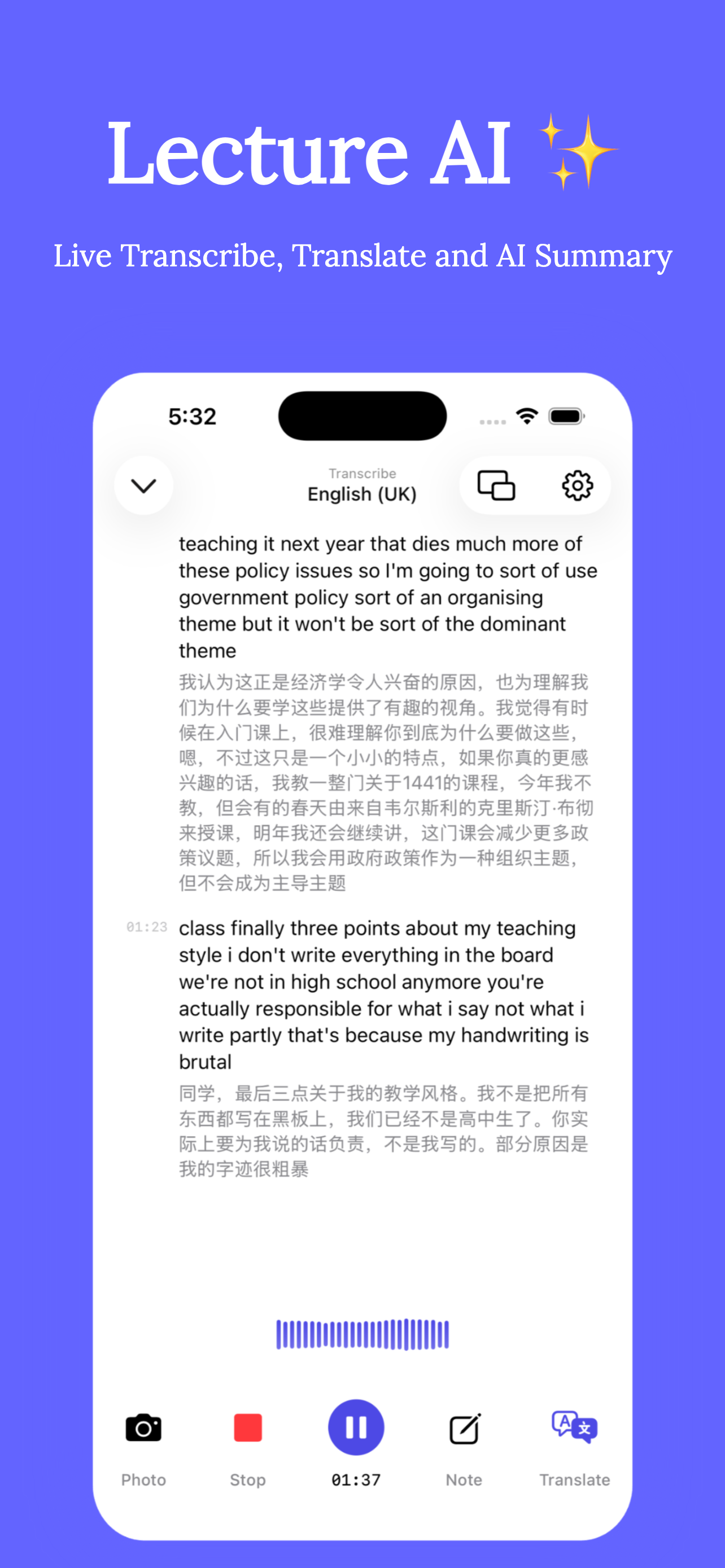
- Add a live translation under the captions. Not to replace the English — to rescue you when a sentence is completely opaque, so you don't lose the next three while decoding it.
- Stop transcribing by hand. If the transcript is being written automatically, your notes can shrink to ideas and questions — the load drops massively.
- Preview 10 minutes before class. Skim the slides or last lecture's summary; knowing the topic's vocabulary in advance is half the battle.
After class: turn confusion into material
- Replay only the hard parts. With a timestamped transcript you re-listen to 4 minutes, not 90.
- Read the bilingual transcript — English first, translation as backup. This is vocabulary training with your actual course content.
- Let AI summarize the lecture into key points in either language, then ask questions about what's still unclear.
How international students use Clearly
- Before class, open Clearly, set the lecture language and your native language for translation.
- Tap Record: live English captions appear with your-language translation under each paragraph — accent-tolerant and tuned for academic terms.
- Import the lecture slides to view them beside the captions (floating-window mode works with other apps too).
- After class, review the bilingual transcript, replay difficult passages by tapping their timestamps, and read the AI summary.
- Ask the AI Tutor to explain anything you didn't catch — in whichever language helps most.
The wean-off plan: weeks 1–4, read the translation freely. Weeks 5–8, English captions first, translation only when stuck. By mid-semester many students keep the transcript for security but barely read the translation — which is exactly how it should go.
Get Clearly free on the App Store
Live transcription, real-time translation in 75+ languages, AI summaries and an AI tutor — on iPhone & iPad.