If you study in a language that isn't your first, the hardest part isn't the reading list — it's the live lecture. It moves fast, there are no subtitles, and by the time you've decoded one sentence the professor is two ideas ahead. Real-time lecture translation fixes exactly this: your phone shows what's being said as text, with a translation in your language underneath, sentence by sentence, as it happens.
Why real-time beats translating after class
Plenty of tools can translate a transcript after the lecture. The problem: you still sat through 90 minutes understanding half of it, and whatever you wanted to ask was gone by the time you understood the question. Live translation changes the class itself:
- You follow the argument while it's being made, so examples and jokes land in context.
- You can raise your hand and participate, because you know what was just said.
- You stop frantically writing words you don't understand — the bilingual transcript is being written for you.
What to look for in a lecture translation app
- Low latency — the translation must keep pace with natural speech, not trail a paragraph behind.
- Accent handling — your professor's English may be Indian, Scottish or German-accented; the recognizer has to cope.
- Academic vocabulary — general-purpose translators butcher discipline terms.
- Bilingual display — original text and translation together, so you learn the terminology instead of avoiding it.
- A saved record — captions that vanish are a missed opportunity; you want the full bilingual transcript for review.
How to get live lecture translation with Clearly
- Install Clearly from the App Store (free) and open it in class.
- Set the lecture language (what the professor speaks) and your translation language — Clearly supports 75+ languages.
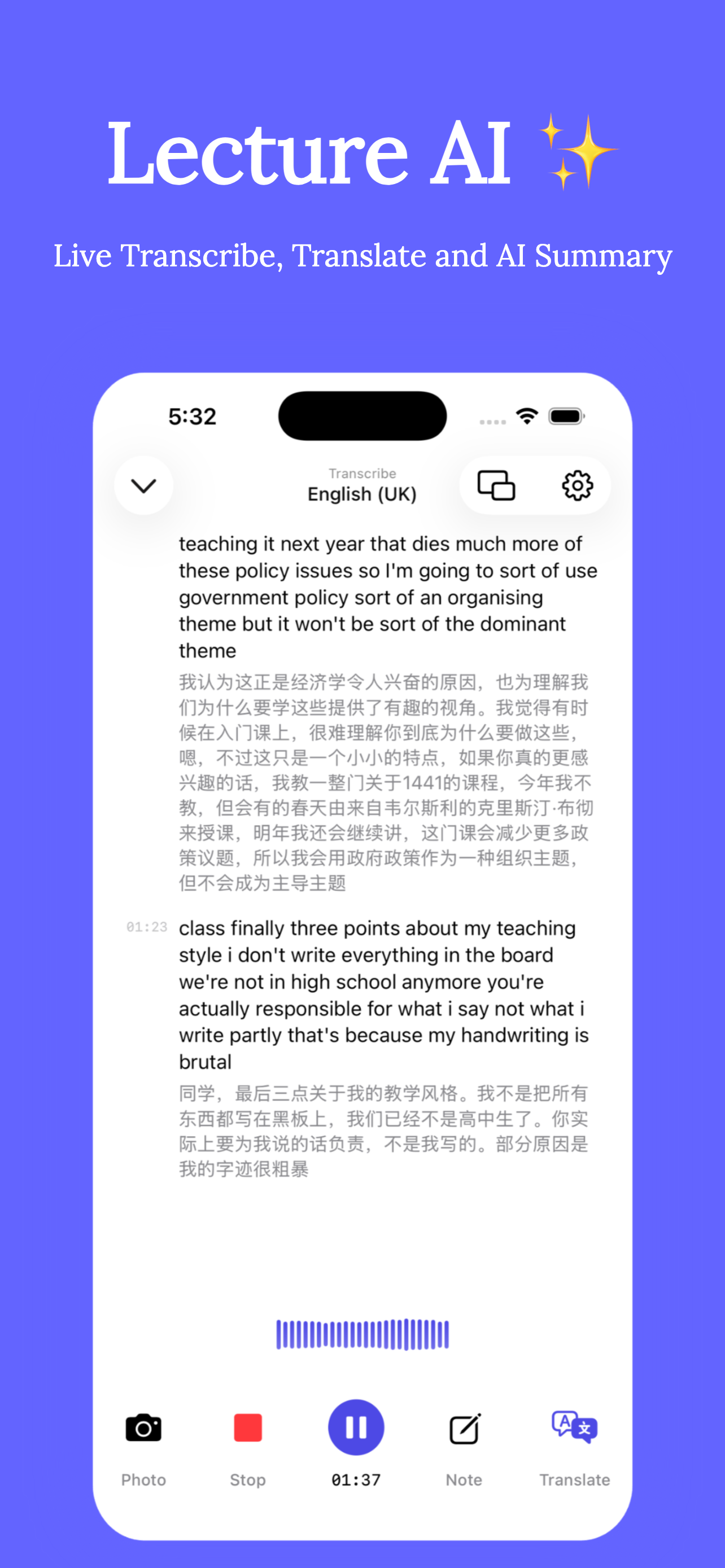
- Tap Record. Each paragraph of the live transcript appears with its translation directly underneath.
- Use floating-window mode to keep the captions on screen while you view slides or take notes in another app.
- After class, review the full bilingual transcript, replay any section of the audio, and read the AI summary in either language.
Make the translation work for you, not instead of you
Study-abroad tip: read the original line first and drop your eyes to the translation only when you're lost. Over a semester you'll rely on the translation less and less — that's the goal. The bilingual transcript doubles as vocabulary training with your actual course material.
Real-time translation is also invaluable in seminars and training sessions where you can't pause anyone, and in fast Q&A exchanges where two languages fly around the room.
Get Clearly free on the App Store
Live transcription, real-time translation in 75+ languages, AI summaries and an AI tutor — on iPhone & iPad.