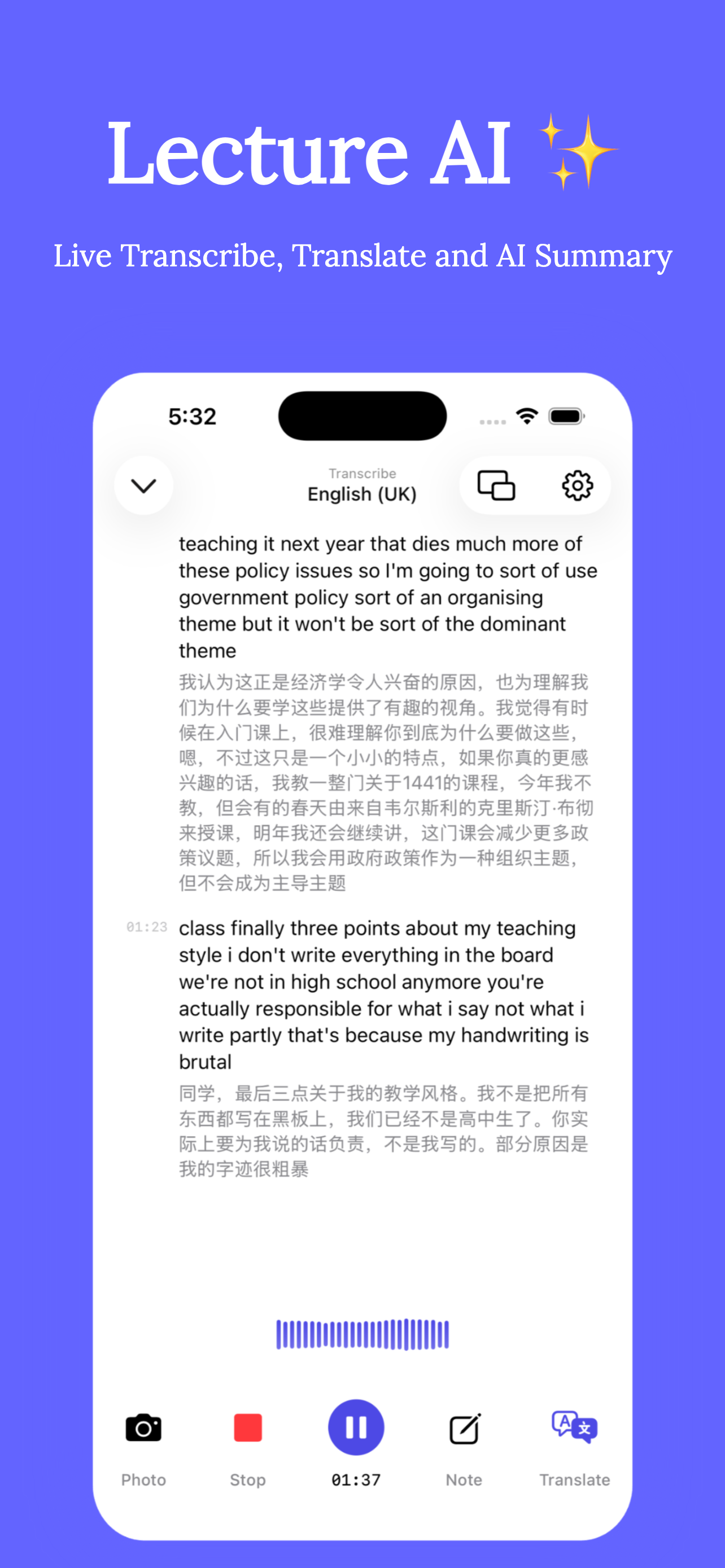
If you're searching for Turbolearn — recently rebranded as Turbo AI — or hunting for a Turbolearn alternative, the real question is what kind of note taker you need. Turbo AI is built around uploading content after the fact and turning it into study materials. Clearly is built around the lecture as it happens: live transcription, real-time translation, slide sync and background recording, with AI summaries and a tutor on top. Here's an honest comparison.
The core difference: live capture vs after-class upload
Upload-based tools process your lecture once it's over — you need a recording from somewhere, and until class ends you're on your own. Clearly starts working the moment your professor does: the transcript scrolls live on your desk, with an instant translation in your language underneath. If you're an international student, or you simply lose the thread in fast lectures, that difference is the whole game.
Feature comparison
| Feature | Clearly | Turbolearn / Turbo AI |
|---|---|---|
| Live transcription during the lecture | ✓ Real-time, on-screen in class | Upload-based processing |
| Real-time translation | ✓ 75+ languages, bilingual transcript | Not a live-translation tool |
| Slide & document sync | ✓ View slides beside live captions; floating window | No live slide sync |
| Background recording | ✓ Record while using other apps | — |
| AI summary & exam key points | ✓ Auto-generated after every recording | ✓ From uploaded content |
| Chat / Q&A with your notes | ✓ AI Tutor grounded in your transcripts, notes & slides | ✓ Chat with uploaded materials |
| Storage & privacy | ✓ Your device + iCloud | Cloud-only |
| Price to start | Free download; Pro for heavy use | Free tier with limits; ~$20/mo for full access |
| Platform | iPhone & iPad | Web + mobile |
When Turbo AI might still fit
To be fair: if your study material is mostly files — PDFs, YouTube videos, readings — and you want flashcards and quizzes generated from them on the web, an upload-based tool does that job. Clearly's flashcards-style review comes through its AI Tutor Q&A rather than a dedicated quiz deck.
When Clearly is the better choice
- You sit in live lectures or seminars and need help during class, not just after.
- You study in a second language and want live translation plus a bilingual transcript.
- You want the recording, transcript, slides and AI notes in one place, tied to timestamps.
- You care where your recordings live — on your device and your iCloud, not someone's cloud only.
Switching is a five-minute job
- Download Clearly free from the App Store.
- Set your lecture language and (optionally) a translation language.
- Record your next class — you'll have a live transcript in minute one, and an AI summary with exam key points seconds after class ends.
- Import your slides and past materials so the AI Tutor can use them too.
Try the live-first alternative
Free on iPhone & iPad. Live transcription, real-time translation, AI summaries and an AI tutor.