Recording lectures sounds like the obvious study hack — until you end the semester with 40 hours of audio you'll never re-listen to. Done right, a lecture recording isn't an audio file; it's a searchable, timestamped, summarized document. Here's how to record properly, and the workflow that makes recordings actually useful.
Step 0: get permission
Before anything else: check that you're allowed to record. Most professors permit recording for personal study, some universities have formal policies, and a few US states have stricter consent laws. Ask once at the start of the semester — it takes ten seconds. Full details in our guide: Is it legal to record lectures?
Getting clean audio from a phone
- Sit in the front third of the room. Every meter closer to the speaker beats any app setting.
- Phone face-up on the desk, unobstructed — not in a pocket, not under a notebook.
- Airplane mode or Do Not Disturb so calls don't interrupt the recording.
- Battery check: a 90-minute lecture with live transcription uses real power; start above 50% or plug in.
Why a plain voice memo isn't enough
A raw recording has no structure: to find the one explanation you need, you scrub blindly through an hour of audio. That's why most lecture recordings are never played back. The fix is recording with transcription — every sentence becomes text with a timestamp, so "find that bit about opportunity cost" becomes a ten-second search instead of a twenty-minute hunt.
How to record a lecture with Clearly
- Open Clearly (free on the App Store) and tap Record when class begins.
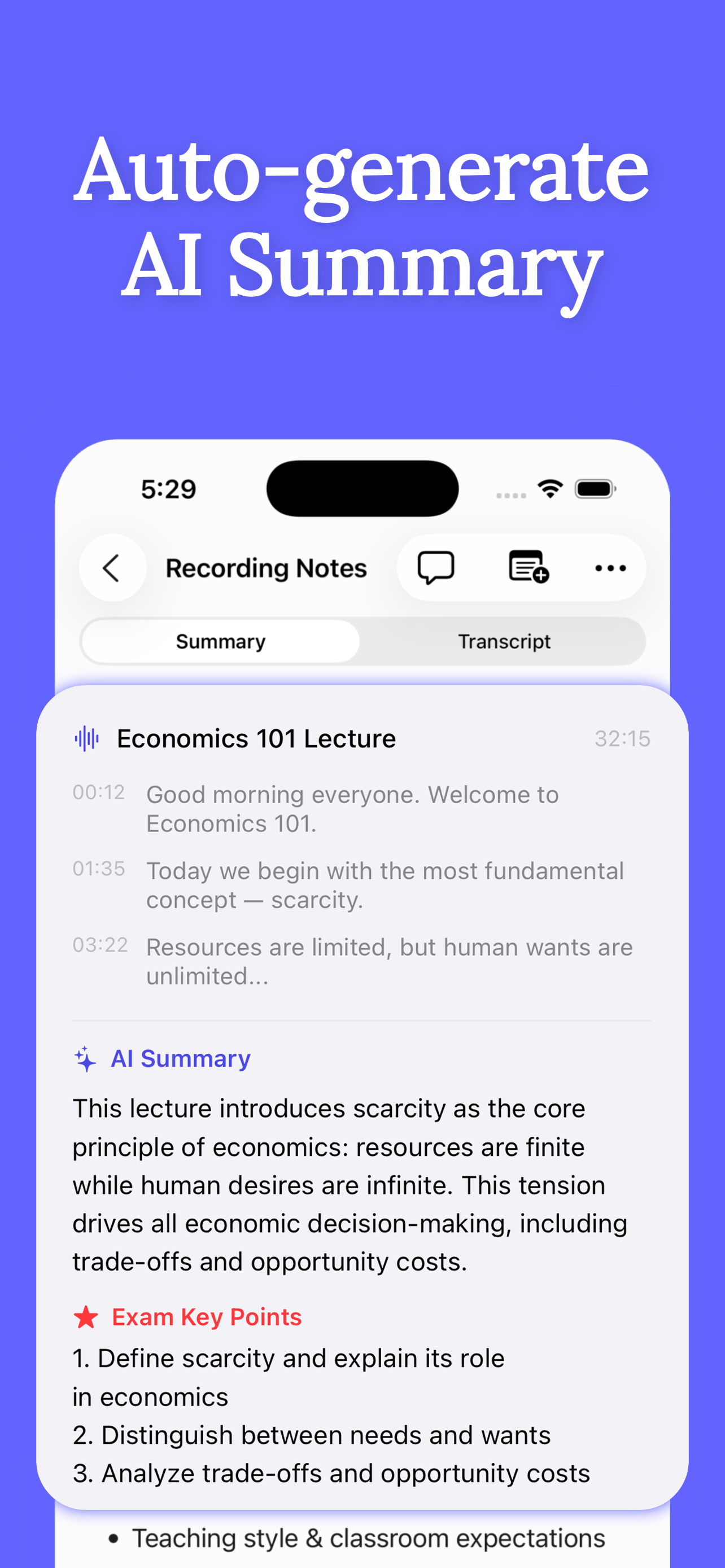
- The lecture is captured as audio and a live, timestamped transcript — with optional real-time translation.
- Snap the whiteboard or slides with the in-app Photo button; they're attached to that moment in the recording.
- Tap Stop at the end. Clearly generates an AI summary with key points and exam-focused notes in seconds.
- Replay any part later by tapping a line of the transcript — the audio jumps straight to that timestamp.
The 10-minute rule for recordings
Within 24 hours of class, spend 10 minutes with the AI summary: read it, mark what's unclear, and ask the AI Tutor about those points. That single habit converts a dead audio archive into exam-ready material — see how to turn recordings into exam notes.
Get Clearly free on the App Store
Live transcription, real-time translation in 75+ languages, AI summaries and an AI tutor — on iPhone & iPad.